![Shaper-KB-Logo.svg]](https://support.shapertools.com/hubfs/Shaper-KB-Logo.svg)
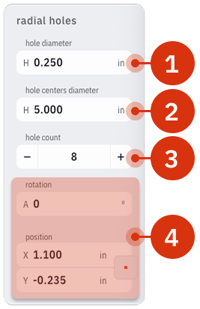
The Radial Holes Template places a ring of evenly spaced circles. They're spaced according to the center of the circles. These parameters can be adjusted:
- Hole Diameter is the diameter of the holes on center
- Hole Centers Diameter is the diameter on which the holes are placed
- Hole Count is the total number of holes placed along that circle
- Rotation and Position changes the angle and location of the Holes on the Studio Grid according to the Center of the pattern