![Shaper-KB-Logo.svg]](https://support.shapertools.com/hubfs/Shaper-KB-Logo.svg)
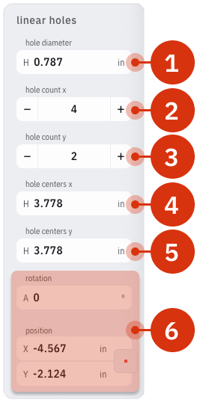
The Linear Holes template creates a Grid or Line of circles that can be used to create holes or other designs. These parameters can be adjusted:
- Hole Diameter adjusts the diameter of the holes
- Hole Count X adds or removes holes horizontally, or the number of columns in a grid
- Hole Count Y adds or removes holes vertically, or the number of rows in a grid
- Holes Center X adjusts the horizontal distance between the holes based on their center
- Holes Center Y adjusts the vertical distance between the holes based on their center
- Rotation and Position changes the angle and location of the Holes on the Studio Grid according to the Center of the bottom left circle