![Shaper-KB-Logo.svg]](https://support.shapertools.com/hubfs/Shaper-KB-Logo.svg)
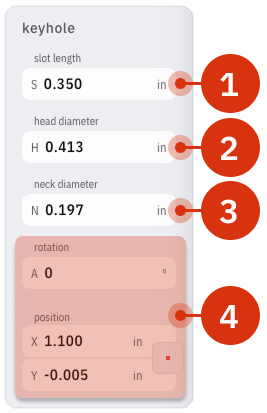
The Keyhole template creates a simple, open line and a Guide representing the final shape of the keyhole. The Guide is for visualization purposes, the line inside is the cut path. These parameters can be adjusted:
- Slot Length is the overall length of the slot
- Head Diameter is the maximum diameter of the cutter. It adjusts the bell of the Guide
- Neck Diameter is the minimum diameter of the cutter. It adjusts the slot of the Guide
- Rotation and Position changes the angle and location of the Keyhole on the Studio Grid