![Shaper-KB-Logo.svg]](https://support.shapertools.com/hubfs/Shaper-KB-Logo.svg)
.jpg?width=341&height=247&name=image%20(2).jpg)
Note: Before shimming your setup, make sure to follow the checklist found here to confirm that it’s necessary. If you need shims, reach out to us at hello@shapertools.com and we’ll get you squared away.
To correctly shim your Workstation, follow these steps:
- Remove Origin from its Harness
- Remove Workstation's Shelf
- Loosen but do not fully remove the four screws attaching Workstation to the BenchPilot Frame
- Insert the shims around the two screws, between Workstation and BenchPilot:
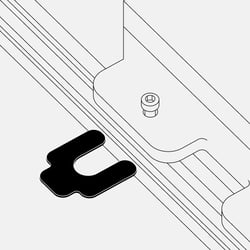
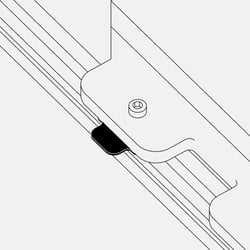
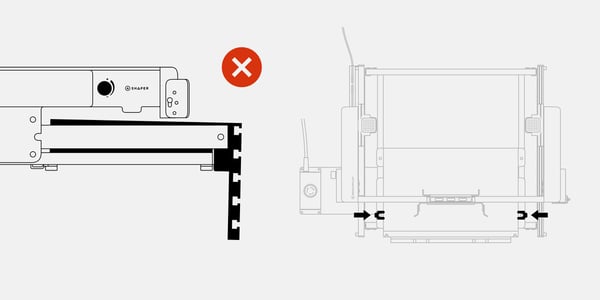
If the rear of Workstation is elevated, place shims under the front two mounting points:
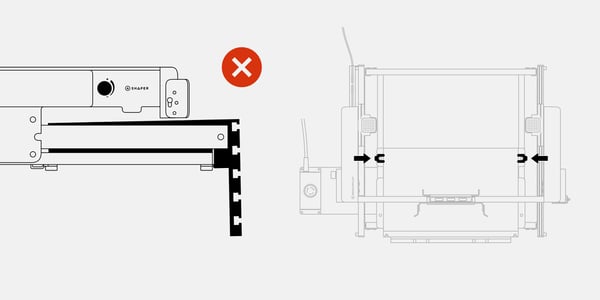
If the front of Workstation is elevated, place shims under the rear two mounting points:
Visually inspect whether or not the Workstation is level. Add or remove shims as necessary:
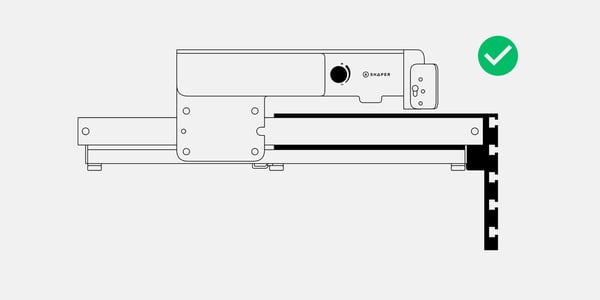
- Once Workstation is level, re-tighten all 4 screws
- Visually inspect once more to ensure the process was successful and there is no longer a gap between your skid pad and the Shelf when Origin is clipped into the Cradle
- Loosen the screws on the side of the Crossbar Carriage per page 39 of the BenchPilot manual
- Re-attach Origin to the Crossbar and re-tighten the Crossbar Carriage screws per page 41 of the BenchPilot manual