---
title: Box Joint Basic in Studio
description: Studio's box joint basic feature
---
[Skip to content](https://support.shapertools.com/template-box-joint-basic#main-content)
- [English](https://support.shapertools.com/template-box-joint-basic)
- [Deutsch](https://support.shapertools.com/de/template-box-joint-basic)
- [Français](https://support.shapertools.com/fr/template-box-joint-basic)
English
Show submenu for translations
[Contact us](https://support.shapertools.com/kb-tickets/new?hsLang=en)
![Shaper-KB-Logo.svg\]](https://support.shapertools.com/hubfs/Shaper-KB-Logo.svg)
Open main navigation
Close main navigation
- - [English](https://support.shapertools.com/template-box-joint-basic)
- [Deutsch](https://support.shapertools.com/de/template-box-joint-basic)
- [Français](https://support.shapertools.com/fr/template-box-joint-basic)
English
Show submenu for translations
- [Contact us](https://support.shapertools.com/kb-tickets/new)
- [Go to shapertools.com](https://www.shapertools.com/)
[Go to shapertools.com](https://www.shapertools.com/)
Shaper Support
- There are no suggestions because the search field is empty.
1. [Help Center](https://support.shapertools.com/?hsLang=en)
2. [Studio](https://support.shapertools.com/studio?hsLang=en)
3. [Templates](https://support.shapertools.com/studio?hsLang=en#templates)
# Box Joint Basic in Studio
## Using Box Joint Basic in Shaper Studio
Studio’s **Box Joint Basic** allows for quick and simple Box Joint patterns similar to [the feature on Origin](https://support.shapertools.com/hc/en-us/articles/360034065933-box-joint-basic?hsLang=en). If you want to setup a more complex pattern use [Box Joint Pro](https://support.shapertools.com/box-joint-pro?hsLang=en).
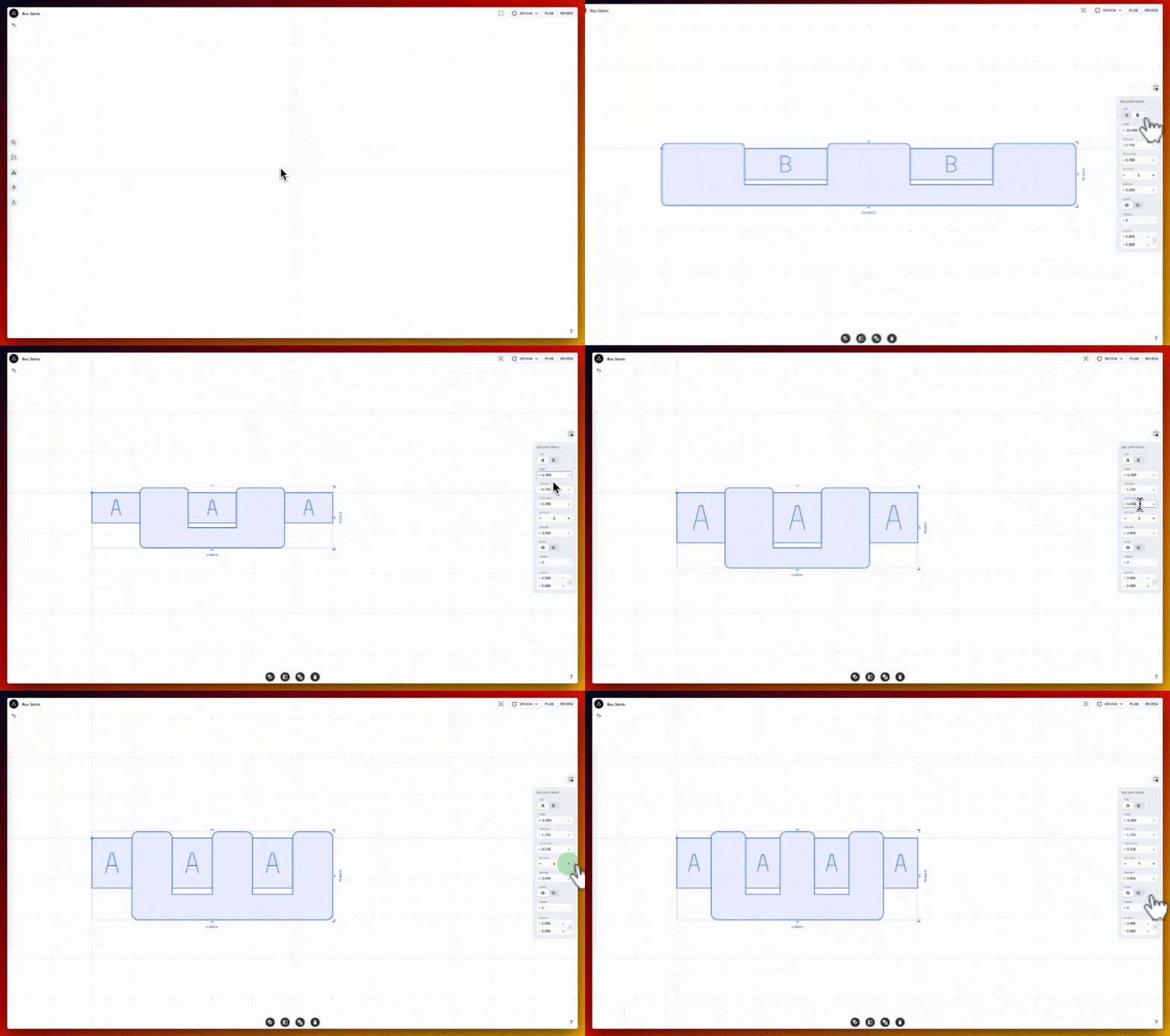
#### Box Joint Basic Options
| 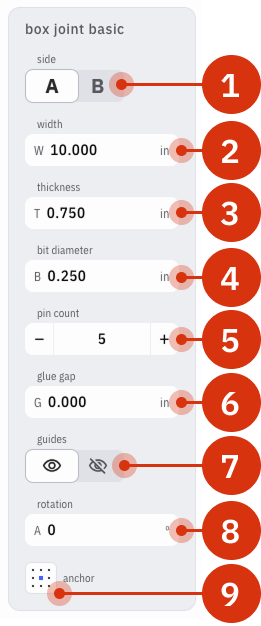 | 1. Side (A/B): Swaps between the A pins and the mating B pins 2. Width: applies the width of the intended stock 3. Thickness: uses the thickness of the stock to plan the overcut and ensure square pins 4. Bit Diameter: determines the curvature of the patterns corners and how much it extrudes from the workpiece to ensure straight corners 5. Pin Count: the overall number of pins, A + B 6. Glue Gap: increases the width of the gaps to account for fitment with glue 7. Guides: places visual guides that represent the pins 8. Rotation: overall rotation of the pattern according to the anchor point in the upper-left position 9. Anchor: the point around which the pattern is oriented for movement, sizing, and rotation |
| --- | --- |
*Note: unlike Origin’s Box Joint Basic feature there is no encoded depth to a Box Joint Basic pattern in Studio. [Encoded depths](https://support.shapertools.com/hc/en-us/articles/10400926390683-encoded-depth?hsLang=en) can be setup manually in [Plan Mode](https://support.shapertools.com/cut-plan-menu?hsLang=en).*
Once the Box Joint pattern is created move it according to the Origin Anchor in Studio to ensure accurate placement on Origin:
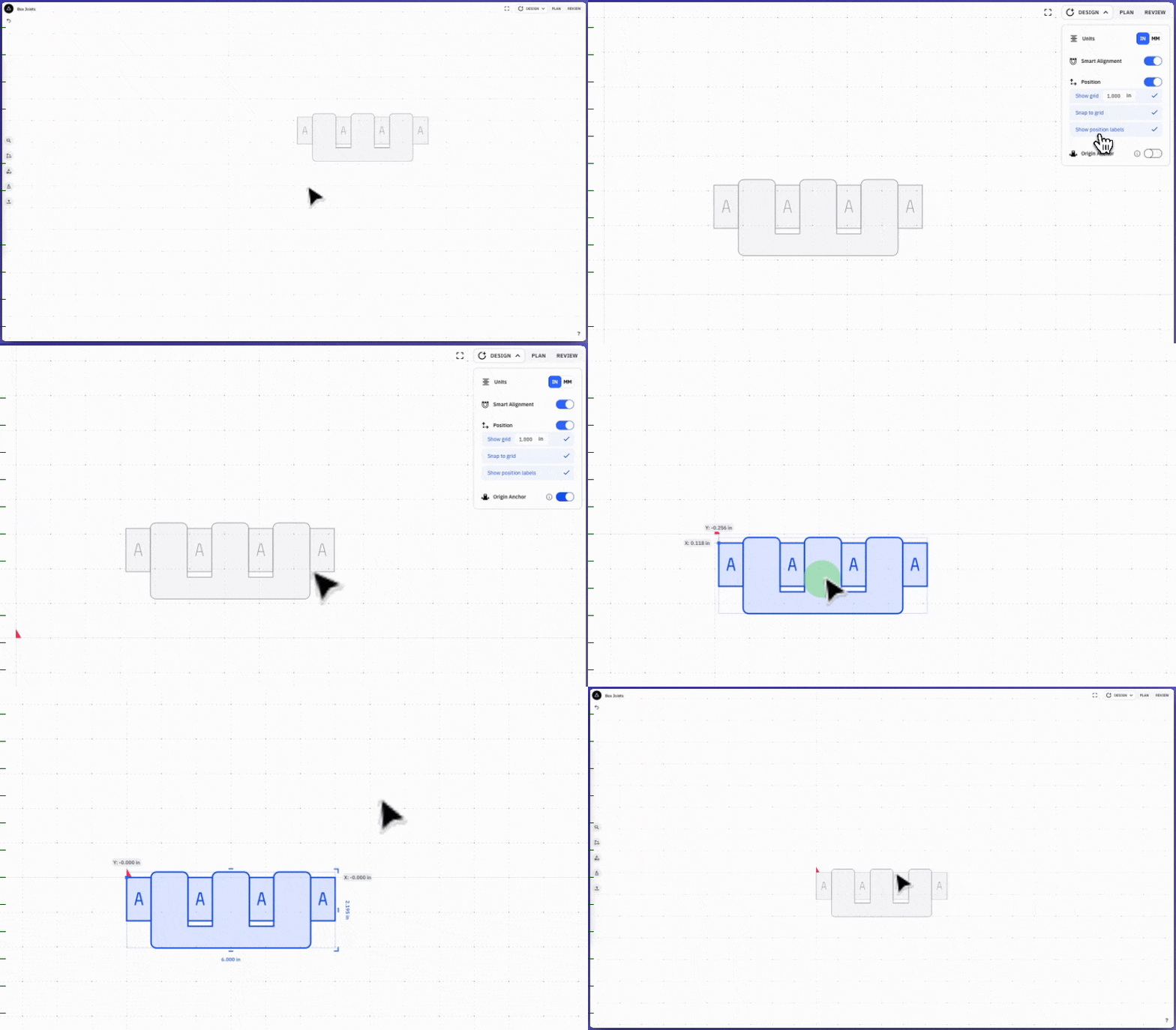
When the pattern is initially placed it will automatically setup to cut the **A-pins**. To cut the **B-pins** choose **B** in the **Edit Selection Menu** on the right ([see above](https://support.shapertools.com/template-box-joint-basic#box-joint-basic-options) for visual) and re-import the design on Origin.
Always Import both the A and B pattern to the 0,0 point on Origin’s Grid.
- [Origin](https://support.shapertools.com/origin?hsLang=en#main-content)
- [Getting Started Guide](https://support.shapertools.com/origin?hsLang=en#getting-started-guide)
- [Workspace Setup](https://support.shapertools.com/origin?hsLang=en#workspace-setup)
- [Scanning](https://support.shapertools.com/origin?hsLang=en#scanning)
- [Design Mode](https://support.shapertools.com/origin?hsLang=en#design-mode)
- [Extensions](https://support.shapertools.com/origin?hsLang=en#extensions)
- [Cut Mode](https://support.shapertools.com/origin?hsLang=en#cut-mode)
- [Cutting Principles and Techniques](https://support.shapertools.com/origin?hsLang=en#cutting-principles-and-techniques)
- [Issues when Cutting](https://support.shapertools.com/origin?hsLang=en#issues-when-cutting)
- [Error Messages](https://support.shapertools.com/origin?hsLang=en#error-messages)
- [Tips and Tricks](https://support.shapertools.com/origin?hsLang=en#tips-and-tricks)
- [Origin FAQs](https://support.shapertools.com/origin?hsLang=en#origin-faqs)
- [Usage FAQs](https://support.shapertools.com/origin?hsLang=en#usage-faqs)
- [Spindle FAQs](https://support.shapertools.com/origin?hsLang=en#spindle-faqs)
- [Returns & Repairs](https://support.shapertools.com/origin?hsLang=en#returns-repairs)
- [BenchPilot](https://support.shapertools.com/benchpilot?hsLang=en#main-content)
- [Connecting to BenchPilot](https://support.shapertools.com/benchpilot?hsLang=en#connecting-to-benchpilot)
- [Before Starting a BenchPilot Cut](https://support.shapertools.com/benchpilot?hsLang=en#before-starting-a-benchpilot-cut)
- [While Cutting with BenchPilot](https://support.shapertools.com/benchpilot?hsLang=en#while-cutting-with-benchpilot)
- [BenchPilot Troubleshooting](https://support.shapertools.com/benchpilot?hsLang=en#benchpilot-troubleshooting)
- [Plate](https://support.shapertools.com/plate?hsLang=en#main-content)
- [Learn About](https://support.shapertools.com/plate?hsLang=en#learn-about)
- [At A Glance](https://support.shapertools.com/plate?hsLang=en#at-a-glance)
- [Aligning Plate](https://support.shapertools.com/plate?hsLang=en#aligning-plate)
- [Origin + Plate Setup](https://support.shapertools.com/plate?hsLang=en#origin-plate-setup)
- [Working with Plate](https://support.shapertools.com/plate?hsLang=en#working-with-plate)
- [Edge Mortising Adapter](https://support.shapertools.com/plate?hsLang=en#edge-mortising-adapter)
- [Maintenance & Technical Data](https://support.shapertools.com/plate?hsLang=en#maintenance-technical-data)
- [Workstation](https://support.shapertools.com/workstation?hsLang=en#main-content)
- [Learn About](https://support.shapertools.com/workstation?hsLang=en#learn-about)
- [Studio](https://support.shapertools.com/studio?hsLang=en#main-content)
- [Using Studio](https://support.shapertools.com/studio?hsLang=en#using-studio)
- [Main Menu](https://support.shapertools.com/studio?hsLang=en#main-menu)
- [Design Mode](https://support.shapertools.com/studio?hsLang=en#design-mode)
- [Plan Mode](https://support.shapertools.com/studio?hsLang=en#plan-mode)
- [Review Mode](https://support.shapertools.com/studio?hsLang=en#review-mode)
- [Templates](https://support.shapertools.com/studio?hsLang=en#templates)
- [License and Account](https://support.shapertools.com/studio?hsLang=en#license-and-account)
- [Trace](https://support.shapertools.com/trace?hsLang=en#main-content)
- [Getting Started](https://support.shapertools.com/trace?hsLang=en#getting-started)
- [Capturing Your Drawing](https://support.shapertools.com/trace?hsLang=en#capturing-your-drawing)
- [Converting Your Drawing to Vectors](https://support.shapertools.com/trace?hsLang=en#converting-your-drawing-to-vectors)
- [Saving Your Vectors](https://support.shapertools.com/trace?hsLang=en#saving-your-vectors)
- [Care & Storage](https://support.shapertools.com/trace?hsLang=en#care-storage)
- [Trace FAQs](https://support.shapertools.com/trace?hsLang=en#trace-faqs)
- [AutoPass](https://support.shapertools.com/autopass?hsLang=en#main-content)
- [Activation](https://support.shapertools.com/autopass?hsLang=en#activation)
- [Before Cutting](https://support.shapertools.com/autopass?hsLang=en#before-cutting)
- [While Cutting](https://support.shapertools.com/autopass?hsLang=en#while-cutting)
- [FAQs](https://support.shapertools.com/autopass?hsLang=en#faqs)
- [Connected Caliper](https://support.shapertools.com/connected-caliper?hsLang=en#main-content)
- [Getting Started with your Connected Caliper](https://support.shapertools.com/connected-caliper?hsLang=en#getting-started-with-your-connected-caliper)
- [Connecting the Caliper to your Device](https://support.shapertools.com/connected-caliper?hsLang=en#connecting-the-caliper-to-your-device)
- [Using the Caliper](https://support.shapertools.com/connected-caliper?hsLang=en#using-the-caliper)
- [Removing the Caliper from your Device](https://support.shapertools.com/connected-caliper?hsLang=en#removing-the-caliper-from-your-device)
- [Care & Maintenance](https://support.shapertools.com/connected-caliper?hsLang=en#care-maintenance)
- [Learn About](https://support.shapertools.com/connected-caliper?hsLang=en#learn-about)
- [Accessories](https://support.shapertools.com/accessories?hsLang=en#main-content)
- [Origin Accessories](https://support.shapertools.com/accessories?hsLang=en#origin-accessories)
- [Basic Bits](https://support.shapertools.com/accessories?hsLang=en#basic-bits)
- [Specialty Router Bits](https://support.shapertools.com/accessories?hsLang=en#specialty-router-bits)
- [ShaperTape FAQs](https://support.shapertools.com/accessories?hsLang=en#shapertape-faqs)
- [Replacement Parts](https://support.shapertools.com/replacement-parts?hsLang=en#main-content)
- [Gen2 Origin](https://support.shapertools.com/replacement-parts?hsLang=en#gen2-origin)
- [Shaper Workstation](https://support.shapertools.com/replacement-parts?hsLang=en#shaper-workstation)
- [Shaper Plate](https://support.shapertools.com/replacement-parts?hsLang=en#shaper-plate)
- [ShaperHub](https://support.shapertools.com/shaperhub?hsLang=en#main-content)
- [ShaperHub](https://support.shapertools.com/shaperhub?hsLang=en#shaperhub)
- [Your Shaper Account](https://support.shapertools.com/your-shaper-account?hsLang=en#main-content)
- [Account Support](https://support.shapertools.com/your-shaper-account?hsLang=en#account-support)
- [Designing for Origin](https://support.shapertools.com/designing-for-origin?hsLang=en#main-content)
- [Overview](https://support.shapertools.com/designing-for-origin?hsLang=en#overview)
- [Adobe Illustrator](https://support.shapertools.com/designing-for-origin?hsLang=en#adobe-illustrator)
- [Affinity Designer](https://support.shapertools.com/designing-for-origin?hsLang=en#affinity-designer)
- [Coreldraw](https://support.shapertools.com/designing-for-origin?hsLang=en#coreldraw)
- [Fusion 360](https://support.shapertools.com/designing-for-origin?hsLang=en#fusion-360)
- [Inkscape](https://support.shapertools.com/designing-for-origin?hsLang=en#inkscape)
- [Palette CAD](https://support.shapertools.com/designing-for-origin?hsLang=en#palette-cad)
- [Rhino 3d](https://support.shapertools.com/designing-for-origin?hsLang=en#rhino-3d)
- [Shapr3d](https://support.shapertools.com/designing-for-origin?hsLang=en#shapr3d)
- [SketchUp](https://support.shapertools.com/designing-for-origin?hsLang=en#sketchup)
- [Pytha](https://support.shapertools.com/designing-for-origin?hsLang=en#pytha)
- [Vectr](https://support.shapertools.com/designing-for-origin?hsLang=en#vectr)
- [Vectorworks](https://support.shapertools.com/designing-for-origin?hsLang=en#vectorworks)
- [Designing Issues](https://support.shapertools.com/designing-for-origin?hsLang=en#designing-issues)
- [Troubleshooting and Maintenance](https://support.shapertools.com/troubleshooting-and-maintenance?hsLang=en)
[](https://shapertools.com?hsLang=en)
Shaper Help Center
Copyright © 2025, Shaper Tools