---
title: Saving your Capture
description: When you're happy with your vectors, tap the blue check mark button to open the output menu. After choosing Save to My Files, you’ll be prompted to name your file. Give the file a unique name and tap
---
[Skip to content](https://support.shapertools.com/hc/en-us/articles/18635380706971-saving-your-capture#main-content)
- [English](https://support.shapertools.com/hc/en-us/articles/18635380706971-saving-your-capture)
- [Deutsch](https://support.shapertools.com/de/hc/de-de/articles/18635380706971-aufnahme-speichern)
- [Français](https://support.shapertools.com/fr/hc/fr-fr/articles/18635380706971-sauvegarder-une-capture-d-écran)
English
Show submenu for translations
![Shaper-KB-Logo.svg\]](https://support.shapertools.com/hubfs/Shaper-KB-Logo.svg)
Open main navigation
Close main navigation
- - [English](https://support.shapertools.com/hc/en-us/articles/18635380706971-saving-your-capture)
- [Deutsch](https://support.shapertools.com/de/hc/de-de/articles/18635380706971-aufnahme-speichern)
- [Français](https://support.shapertools.com/fr/hc/fr-fr/articles/18635380706971-sauvegarder-une-capture-d-écran)
English
Show submenu for translations
- [Go to shapertools.com](https://www.shapertools.com/)
[Go to shapertools.com](https://www.shapertools.com/)
Shaper Support
- There are no suggestions because the search field is empty.
1. [Help Center](https://support.shapertools.com/?hsLang=en)
2. [Trace](https://support.shapertools.com/trace?hsLang=en)
3. [Saving Your Vectors](https://support.shapertools.com/trace?hsLang=en#saving-your-vectors)
# Saving your Capture
When you're happy with your vectors, tap the blue check mark button to open the output menu.
### Save to My Files
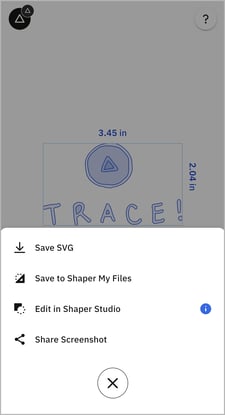
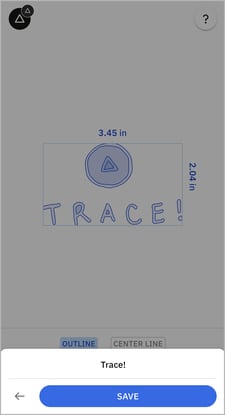
After choosing **Save to My Files,** you’ll be prompted to name your file. Give the file a unique name and tap **Save**.
|  |  |  |
| --- | --- | --- |
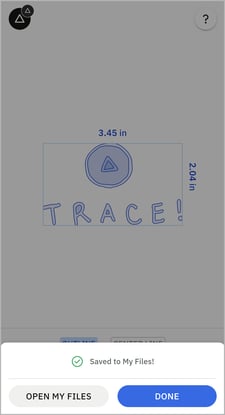
| Click **Save to Shaper My Files** | Name File | Saved Successfully |
Now you can access the file on your Origin or in [Studio](https://support.shapertools.com/hc/en-us/articles/www.shapertools.com/studio?hsLang=en). Alternatively, you can download the SVG directly to your device from [Shaper My Files](https://support.shapertools.com/hc/en-us/articles/8020255379483?hsLang=en).
### Save SVG
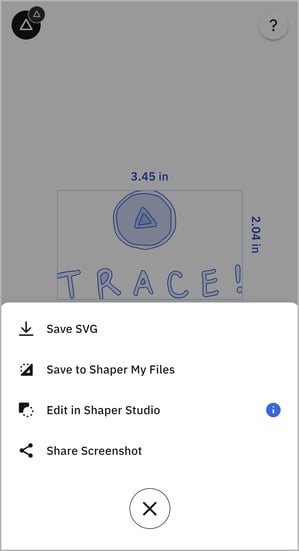
After choosing the **Save SVG** option, your device's share drawer will open, allowing you to choose a save destination for the SVG.
|  |  |
| --- | --- |
| Click **Save SVG** | Share Drawer |
*Note: the options available in the share drawer will differ based on whether you are using an iOS or Android device.*
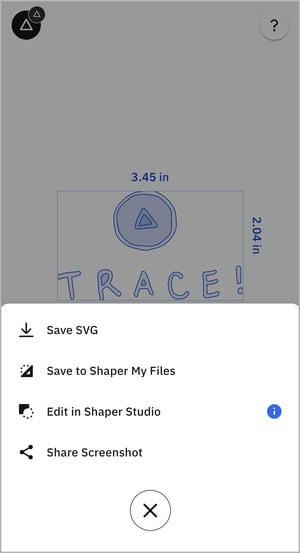
### Edit in Studio
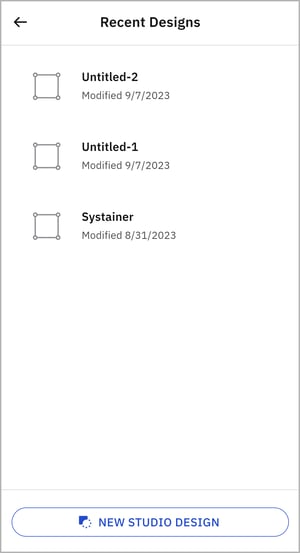
After choosing the **Edit in Studio** option, you can either select one of your recently created Studio Designs or create a new Studio Design.
To add your capture to a new Studio Design, tap **Add to New Design**.
To add your capture to a recent Studio Design, select a design from the list and tap **Add to Recent Design**.
|  |  |
| --- | --- |
| Click **Edit in Shaper Studio** | Choose **Recent** or **New Studio Design** |
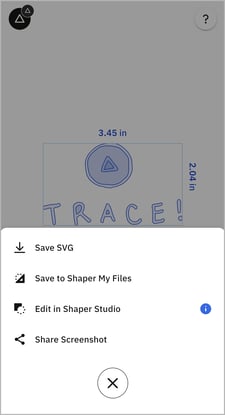
### Share Screenshot
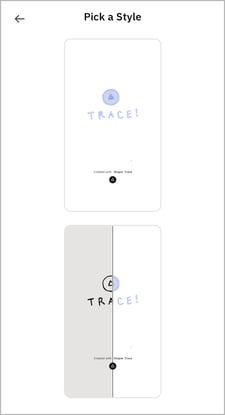
After choosing the **Share Screenshot** option, you will be able to pick from two styles of image.
Choose between a screenshot showing the vectors and a screenshot showing both the original drawing (on the left) and the converted vectors (on the right).
After you choose your style, your device's share drawer will open allowing you to choose where to share the screenshot, e.g. messages, email, social media etc.
*Note that the options available in the share drawer will differ based on whether you are using an iOS or Android device.*
|  |  |  |
| --- | --- | --- |
| Click **Share Screenshot** | Pick a screenshot style | Share drawer |
*Note: If Trace was opened from Studio’s import menu, the above save options will not be shown. On clicking the blue check mark button, you will be returned to the Studio Design from which you opened Trace. Your Trace vectors will be imported into the Studio Design.*
- [Origin](https://support.shapertools.com/origin?hsLang=en#main-content)
- [Getting Started Guide](https://support.shapertools.com/origin?hsLang=en#getting-started-guide)
- [Workspace Setup](https://support.shapertools.com/origin?hsLang=en#workspace-setup)
- [Scanning](https://support.shapertools.com/origin?hsLang=en#scanning)
- [Design Mode](https://support.shapertools.com/origin?hsLang=en#design-mode)
- [Extensions](https://support.shapertools.com/origin?hsLang=en#extensions)
- [Cut Mode](https://support.shapertools.com/origin?hsLang=en#cut-mode)
- [Cutting Principles and Techniques](https://support.shapertools.com/origin?hsLang=en#cutting-principles-and-techniques)
- [Issues when Cutting](https://support.shapertools.com/origin?hsLang=en#issues-when-cutting)
- [Error Messages](https://support.shapertools.com/origin?hsLang=en#error-messages)
- [Tips and Tricks](https://support.shapertools.com/origin?hsLang=en#tips-and-tricks)
- [Origin FAQs](https://support.shapertools.com/origin?hsLang=en#origin-faqs)
- [Usage FAQs](https://support.shapertools.com/origin?hsLang=en#usage-faqs)
- [Spindle FAQs](https://support.shapertools.com/origin?hsLang=en#spindle-faqs)
- [Returns & Repairs](https://support.shapertools.com/origin?hsLang=en#returns-repairs)
- [BenchPilot](https://support.shapertools.com/benchpilot?hsLang=en#main-content)
- [Connecting to BenchPilot](https://support.shapertools.com/benchpilot?hsLang=en#connecting-to-benchpilot)
- [Before Starting a BenchPilot Cut](https://support.shapertools.com/benchpilot?hsLang=en#before-starting-a-benchpilot-cut)
- [While Cutting with BenchPilot](https://support.shapertools.com/benchpilot?hsLang=en#while-cutting-with-benchpilot)
- [BenchPilot Troubleshooting](https://support.shapertools.com/benchpilot?hsLang=en#benchpilot-troubleshooting)
- [Plate](https://support.shapertools.com/plate?hsLang=en#main-content)
- [Learn About](https://support.shapertools.com/plate?hsLang=en#learn-about)
- [At A Glance](https://support.shapertools.com/plate?hsLang=en#at-a-glance)
- [Aligning Plate](https://support.shapertools.com/plate?hsLang=en#aligning-plate)
- [Origin + Plate Setup](https://support.shapertools.com/plate?hsLang=en#origin-plate-setup)
- [Working with Plate](https://support.shapertools.com/plate?hsLang=en#working-with-plate)
- [Edge Mortising Adapter](https://support.shapertools.com/plate?hsLang=en#edge-mortising-adapter)
- [Maintenance & Technical Data](https://support.shapertools.com/plate?hsLang=en#maintenance-technical-data)
- [Workstation](https://support.shapertools.com/workstation?hsLang=en#main-content)
- [Learn About](https://support.shapertools.com/workstation?hsLang=en#learn-about)
- [Studio](https://support.shapertools.com/studio?hsLang=en#main-content)
- [Using Studio](https://support.shapertools.com/studio?hsLang=en#using-studio)
- [Main Menu](https://support.shapertools.com/studio?hsLang=en#main-menu)
- [Design Mode](https://support.shapertools.com/studio?hsLang=en#design-mode)
- [Plan Mode](https://support.shapertools.com/studio?hsLang=en#plan-mode)
- [Review Mode](https://support.shapertools.com/studio?hsLang=en#review-mode)
- [Templates](https://support.shapertools.com/studio?hsLang=en#templates)
- [License and Account](https://support.shapertools.com/studio?hsLang=en#license-and-account)
- [Trace](https://support.shapertools.com/trace?hsLang=en#main-content)
- [Getting Started](https://support.shapertools.com/trace?hsLang=en#getting-started)
- [Capturing Your Drawing](https://support.shapertools.com/trace?hsLang=en#capturing-your-drawing)
- [Converting Your Drawing to Vectors](https://support.shapertools.com/trace?hsLang=en#converting-your-drawing-to-vectors)
- [Saving Your Vectors](https://support.shapertools.com/trace?hsLang=en#saving-your-vectors)
- [Care & Storage](https://support.shapertools.com/trace?hsLang=en#care-storage)
- [Trace FAQs](https://support.shapertools.com/trace?hsLang=en#trace-faqs)
- [AutoPass](https://support.shapertools.com/autopass?hsLang=en#main-content)
- [Activation](https://support.shapertools.com/autopass?hsLang=en#activation)
- [Before Cutting](https://support.shapertools.com/autopass?hsLang=en#before-cutting)
- [While Cutting](https://support.shapertools.com/autopass?hsLang=en#while-cutting)
- [FAQs](https://support.shapertools.com/autopass?hsLang=en#faqs)
- [Connected Caliper](https://support.shapertools.com/connected-caliper?hsLang=en#main-content)
- [Getting Started with your Connected Caliper](https://support.shapertools.com/connected-caliper?hsLang=en#getting-started-with-your-connected-caliper)
- [Connecting the Caliper to your Device](https://support.shapertools.com/connected-caliper?hsLang=en#connecting-the-caliper-to-your-device)
- [Using the Caliper](https://support.shapertools.com/connected-caliper?hsLang=en#using-the-caliper)
- [Removing the Caliper from your Device](https://support.shapertools.com/connected-caliper?hsLang=en#removing-the-caliper-from-your-device)
- [Care & Maintenance](https://support.shapertools.com/connected-caliper?hsLang=en#care-maintenance)
- [Learn About](https://support.shapertools.com/connected-caliper?hsLang=en#learn-about)
- [Accessories](https://support.shapertools.com/accessories?hsLang=en#main-content)
- [Origin Accessories](https://support.shapertools.com/accessories?hsLang=en#origin-accessories)
- [Basic Bits](https://support.shapertools.com/accessories?hsLang=en#basic-bits)
- [Specialty Router Bits](https://support.shapertools.com/accessories?hsLang=en#specialty-router-bits)
- [ShaperTape FAQs](https://support.shapertools.com/accessories?hsLang=en#shapertape-faqs)
- [Replacement Parts](https://support.shapertools.com/replacement-parts?hsLang=en#main-content)
- [Gen2 Origin](https://support.shapertools.com/replacement-parts?hsLang=en#gen2-origin)
- [Shaper Workstation](https://support.shapertools.com/replacement-parts?hsLang=en#shaper-workstation)
- [Shaper Plate](https://support.shapertools.com/replacement-parts?hsLang=en#shaper-plate)
- [ShaperHub](https://support.shapertools.com/shaperhub?hsLang=en#main-content)
- [ShaperHub](https://support.shapertools.com/shaperhub?hsLang=en#shaperhub)
- [Designing for Origin](https://support.shapertools.com/designing-for-origin?hsLang=en#main-content)
- [Overview](https://support.shapertools.com/designing-for-origin?hsLang=en#overview)
- [Adobe Illustrator](https://support.shapertools.com/designing-for-origin?hsLang=en#adobe-illustrator)
- [Affinity Designer](https://support.shapertools.com/designing-for-origin?hsLang=en#affinity-designer)
- [Coreldraw](https://support.shapertools.com/designing-for-origin?hsLang=en#coreldraw)
- [Fusion 360](https://support.shapertools.com/designing-for-origin?hsLang=en#fusion-360)
- [Inkscape](https://support.shapertools.com/designing-for-origin?hsLang=en#inkscape)
- [Palette CAD](https://support.shapertools.com/designing-for-origin?hsLang=en#palette-cad)
- [Rhino 3d](https://support.shapertools.com/designing-for-origin?hsLang=en#rhino-3d)
- [Shapr3d](https://support.shapertools.com/designing-for-origin?hsLang=en#shapr3d)
- [SketchUp](https://support.shapertools.com/designing-for-origin?hsLang=en#sketchup)
- [Pytha](https://support.shapertools.com/designing-for-origin?hsLang=en#pytha)
- [Vectr](https://support.shapertools.com/designing-for-origin?hsLang=en#vectr)
- [Vectorworks](https://support.shapertools.com/designing-for-origin?hsLang=en#vectorworks)
- [Designing Issues](https://support.shapertools.com/designing-for-origin?hsLang=en#designing-issues)
- [Troubleshooting and Maintenance](https://support.shapertools.com/troubleshooting-and-maintenance?hsLang=en)
[](https://shapertools.com?hsLang=en)
Shaper Help Center
Copyright © 2025, Shaper Tools