---
title: Créer une grille
description: Cette vidéo propose une présentation complète du nouvel outil de grille amélioré présenté dans notre mise à jour Humboldt. Afin de créer une nouvelle grille, Origin devra abaisser la fraise pour que
---
[Passer au contenu](https://support.shapertools.com/fr/hc/fr-fr/articles/115002904354-créer-une-grille#main-content)
- [Français](https://support.shapertools.com/fr/hc/fr-fr/articles/115002904354-cr%C3%A9er-une-grille)
- [Deutsch](https://support.shapertools.com/de/hc/de-de/articles/115002904354-raster-erstellen)
- [English](https://support.shapertools.com/hc/en-us/articles/115002904354-creating-a-grid)
Français
Afficher le sous-menu pour les traductions
[Contacte-nous](https://support.shapertools.com/fr/kb-tickets/new?hsLang=fr)
![Shaper-KB-Logo.svg\]](https://support.shapertools.com/hubfs/Shaper-KB-Logo.svg)
Ouvrir la navigation principale
Fermer la navigation principale
- - [Français](https://support.shapertools.com/fr/hc/fr-fr/articles/115002904354-cr%C3%A9er-une-grille)
- [Deutsch](https://support.shapertools.com/de/hc/de-de/articles/115002904354-raster-erstellen)
- [English](https://support.shapertools.com/hc/en-us/articles/115002904354-creating-a-grid)
Français
Afficher le sous-menu pour les traductions
- [Contacte-nous](https://support.shapertools.com/fr/kb-tickets/new)
- [Visite shapertools.com](https://www.shapertools.com/)
[Visite shapertools.com](https://www.shapertools.com/)
Soutien Shaper
- Il n'y a aucune suggestion car le champ de recherche est vide.
1. [Centre d'aide](https://support.shapertools.com/fr?hsLang=fr)
2. [Origin](https://support.shapertools.com/fr/origin?hsLang=fr)
3. [Le mode dessiner](https://support.shapertools.com/fr/origin?hsLang=fr#le-mode-dessiner)
# Créer une grille
Cette vidéo propose une présentation complète du nouvel outil de grille amélioré présenté dans notre [mise à jour Humboldt.](https://www.shapertools.com/releases/origin#humboldt)
Afin de créer une nouvelle grille, Origin devra abaisser la fraise pour que celle-ci puisse s'appuyer sur le côté de ton matériau. Pour obtenir la grille la plus précise possible, nous te recommandons d'utiliser l'extrémité opposée de ta fraise à graver pour effectuer la mesure.
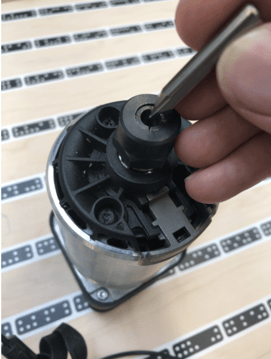 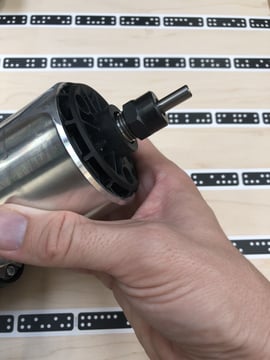
Note : La broche ne doit être mise sous tension à aucun moment de cette procédure.
En mode Dessiner, clique sur le mode à Grille sur la gauche.
Sélectionne Nouveau,amène Origin au bord de ton matériau afin que la fraise puisse se déplacer vers le bas dans la zone libre (le point de l'axe des x n'est pas important ici). Tu contrôles la profondeur à l'aide des boutons verts et oranges de la poignée. N'oublie pas de confirmer que le diamètre de la fraise que tu as entré est exact. Entre le diamètre de la partie de ta fraise que tu utilises pour faire la référence (par exemple 8 mm quand tu utilises l'extrémité opposée de ta fraise à graver).
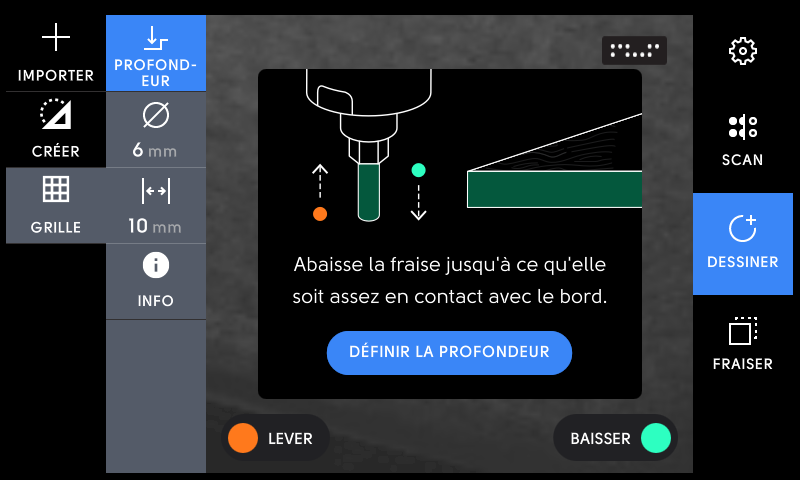
La profondeur parfaite est obtenue lorsque la fraise peut bien venir s’appuyer sur le bord du matériau. Appuie ensuite sur "Définir la profondeur". Assure-toi que seul la fraise est en contact avec le matériau.
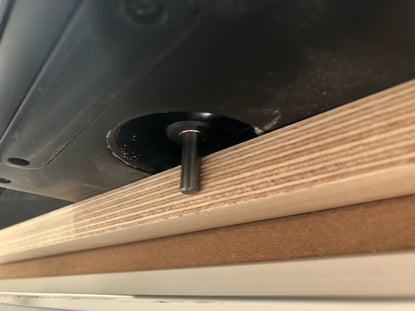
Place Origin de façon qu’elle voit suffisamment de ShaperTape lors du déplacement sur les axes. Tout d'abord, déplace-toi avec précaution vers un point de l'axe X droit et cliquez sur "Référence 1".
Tu peux maintenant choisir d'utiliser le bord de la fraise qui te plait le plus pour faire les points de références. (bord supérieur, le bord inférieur ou le centre de la fraise) Touche l'icône "bord" pour passer d'une option à l'autre.
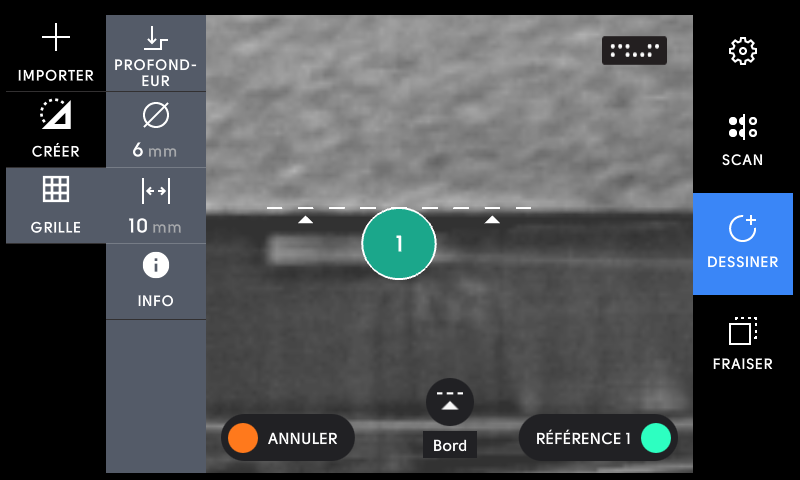
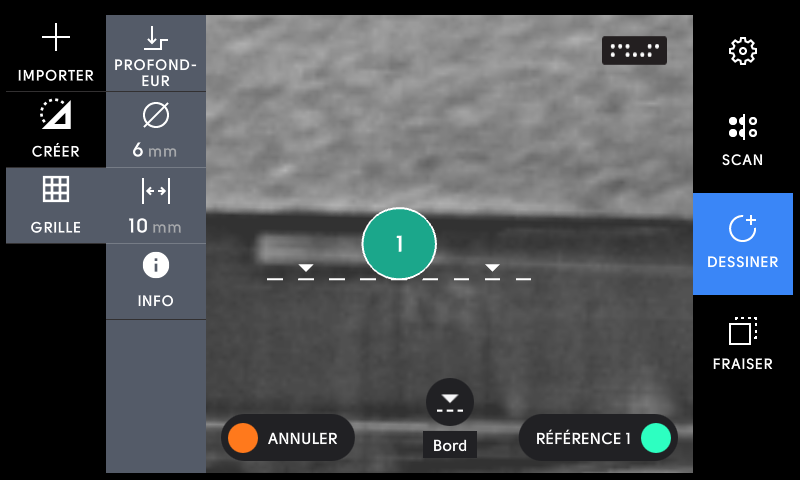
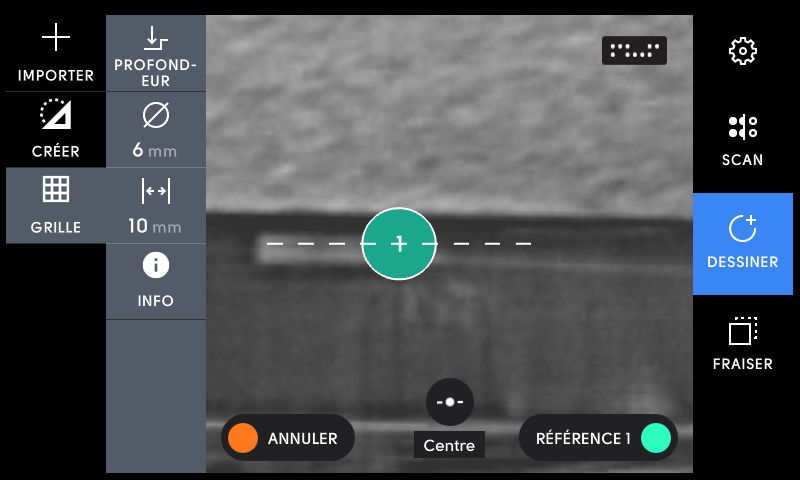
Ensuite, déplace-toi vers la gauche le long de l'axe X et appuie à nouveau sur "Référence 2".
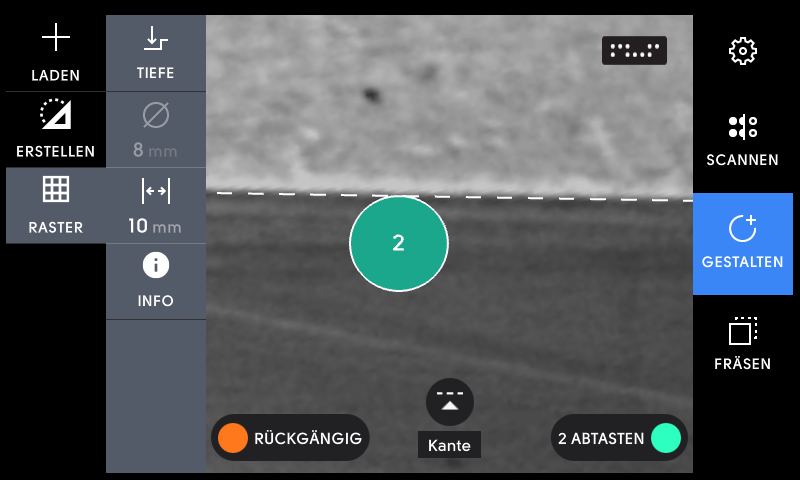
Maintenant, déplace Origin sur le côté gauche de ta pièce pour déterminer l'axe Y. Depuis la mise à jour du logiciel Humboldt, tu peux également définir l'axe Y sur le bord droit de la pièce. (Pour en savoir plus, voir l'article à propos des [méthode de création de grilles](https://support.shapertools.com/fr/hc/fr-fr/articles/360048848473-techniques-de-grille?hsLang=fr))
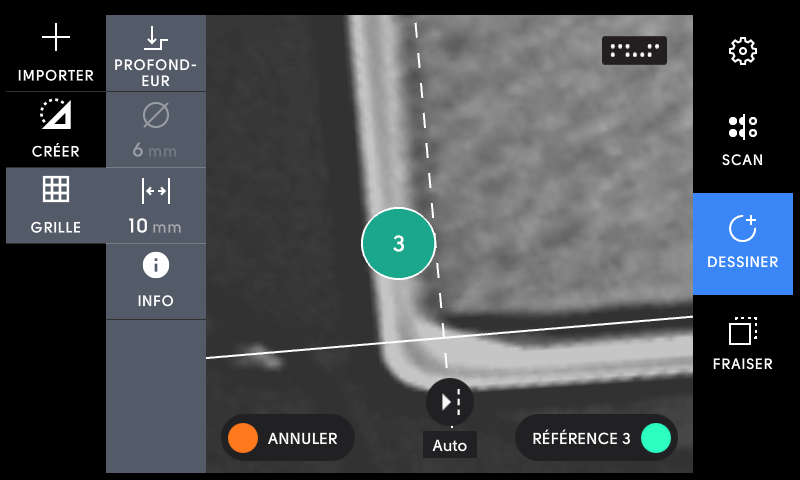
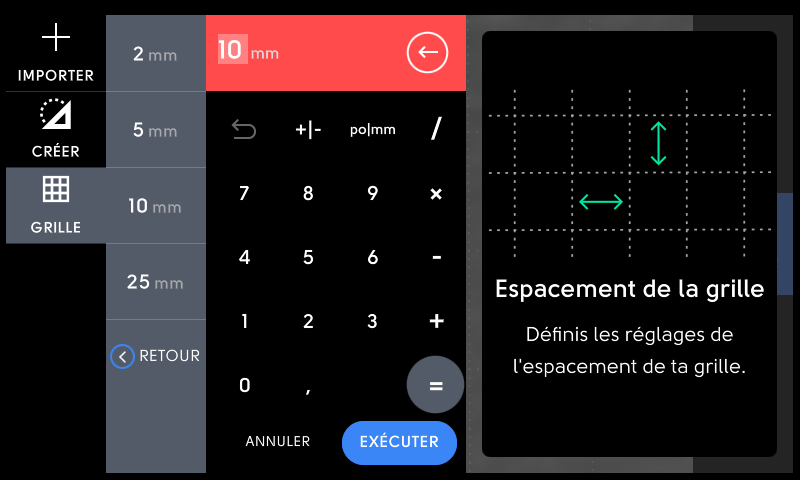
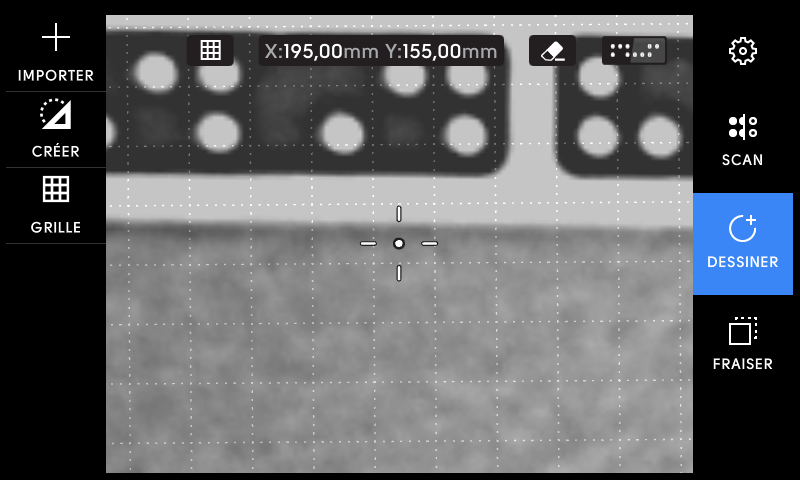
Ta grille est maintenant opérationnelle. Lors du placement et de la création des contours, le point d'ancrage s'accroche aux points de grille. Tu peux modifier la distances entre les points de la grille individuellement sous Grille \> Modifier (min. 0,5 mm).
Les coordonnées indiquées dans l'affichage ci-dessus se réfèrent à la distance au point zéro des axes X/Y. Dans la plupart des cas, il s'agit du coin inférieur gauche de ton matériau.
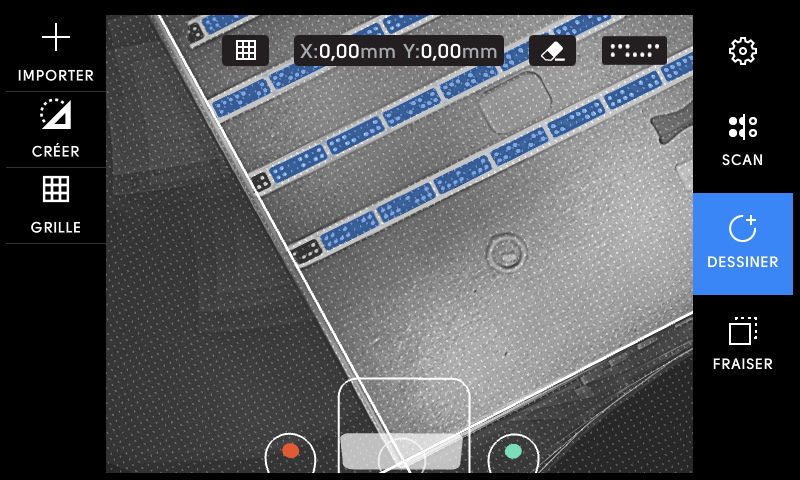
Pour masquer la grille, touche l'icône en haut au centre de l'écran. Tu peux maintenant placer une forme de manière totalement libre.
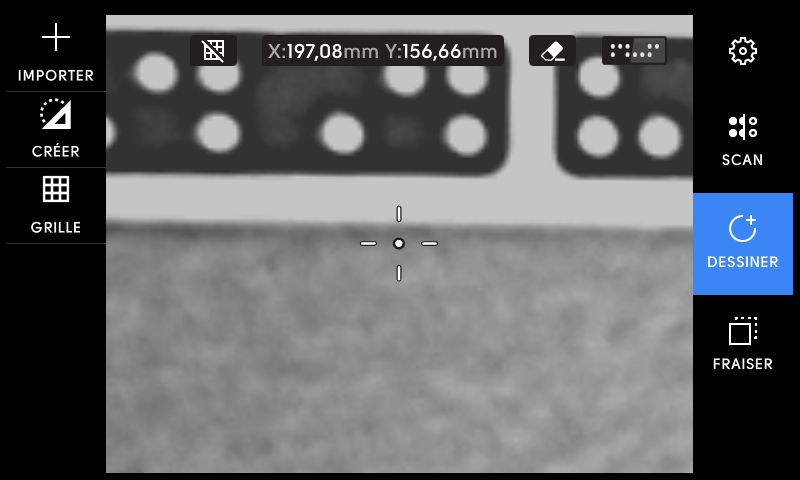
Après avoir tapé à nouveau, la grille réapparaît et le point d'ancrage de la forme est à nouveau orienté par les points de la grille.
- [Origin](https://support.shapertools.com/fr/origin?hsLang=fr#main-content)
- [Pour bien démarrer](https://support.shapertools.com/fr/origin?hsLang=fr#pour-bien-d%C3%A9marrer)
- [Configuration de l'espace de travail](https://support.shapertools.com/fr/origin?hsLang=fr#configuration-de-lespace-de-travail)
- [Le mode scan](https://support.shapertools.com/fr/origin?hsLang=fr#le-mode-scan)
- [Le mode dessiner](https://support.shapertools.com/fr/origin?hsLang=fr#le-mode-dessiner)
- [Extensions](https://support.shapertools.com/fr/origin?hsLang=fr#extensions)
- [Le mode fraiser](https://support.shapertools.com/fr/origin?hsLang=fr#le-mode-fraiser)
- [Principes et techniques de fraisage](https://support.shapertools.com/fr/origin?hsLang=fr#principes-et-techniques-de-fraisage)
- [Problèmes de fraisage](https://support.shapertools.com/fr/origin?hsLang=fr#probl%C3%A8mes-de-fraisage)
- [Messages d'erreur](https://support.shapertools.com/fr/origin?hsLang=fr#messages-derreur)
- [Trucs et astuces](https://support.shapertools.com/fr/origin?hsLang=fr#trucs-et-astuces)
- [FAQ sur Origin](https://support.shapertools.com/fr/origin?hsLang=fr#faq-sur-origin)
- [FAQ sur l'utilisation](https://support.shapertools.com/fr/origin?hsLang=fr#faq-sur-lutilisation)
- [FAQs sur la broche](https://support.shapertools.com/fr/origin?hsLang=fr#faqs-sur-la-broche)
- [Retours et réparations](https://support.shapertools.com/fr/origin?hsLang=fr#retours-et-r%C3%A9parations)
- [BenchPilot](https://support.shapertools.com/fr/benchpilot?hsLang=fr#main-content)
- [Connecter à BenchPilot](https://support.shapertools.com/fr/benchpilot?hsLang=fr#connecter-%C3%A0-benchpilot)
- [Réglages avant le fraisage](https://support.shapertools.com/fr/benchpilot?hsLang=fr#r%C3%A9glages-avant-le-fraisage)
- [Réglages pendant le fraisage](https://support.shapertools.com/fr/benchpilot?hsLang=fr#r%C3%A9glages-pendant-le-fraisage)
- [Dépannage de BenchPilot](https://support.shapertools.com/fr/benchpilot?hsLang=fr#d%C3%A9pannage-de-benchpilot)
- [Plate](https://support.shapertools.com/fr/plate?hsLang=fr#main-content)
- [Plate général](https://support.shapertools.com/fr/plate?hsLang=fr#plate-g%C3%A9n%C3%A9ral)
- [En un coup d'œil](https://support.shapertools.com/fr/plate?hsLang=fr#en-un-coup-d%C5%93il)
- [Alignements avec Plate](https://support.shapertools.com/fr/plate?hsLang=fr#alignements-avec-plate)
- [Configuration avec Origin + Plate](https://support.shapertools.com/fr/plate?hsLang=fr#configuration-avec-origin-plate)
- [Travailler avec Plate](https://support.shapertools.com/fr/plate?hsLang=fr#travailler-avec-plate)
- [Butée de guidage](https://support.shapertools.com/fr/plate?hsLang=fr#but%C3%A9e-de-guidage)
- [Entretien et données techniques](https://support.shapertools.com/fr/plate?hsLang=fr#entretien-et-donn%C3%A9es-techniques)
- [Workstation](https://support.shapertools.com/fr/workstation?hsLang=fr#main-content)
- [En savoir plus](https://support.shapertools.com/fr/workstation?hsLang=fr#en-savoir-plus)
- [Studio](https://support.shapertools.com/fr/studio?hsLang=fr#main-content)
- [Utiliser Studio](https://support.shapertools.com/fr/studio?hsLang=fr#utiliser-studio)
- [Menu principal](https://support.shapertools.com/fr/studio?hsLang=fr#menu-principal)
- [Le mode dessiner](https://support.shapertools.com/fr/studio?hsLang=fr#le-mode-dessiner)
- [Le mode Plannifier](https://support.shapertools.com/fr/studio?hsLang=fr#le-mode-plannifier)
- [Review Mode](https://support.shapertools.com/fr/studio?hsLang=fr#review-mode)
- [Shapes+](https://support.shapertools.com/fr/studio?hsLang=fr#shapes)
- [Licence et compte](https://support.shapertools.com/fr/studio?hsLang=fr#licence-et-compte)
- [Trace](https://support.shapertools.com/fr/trace?hsLang=fr#main-content)
- [Pour commencer](https://support.shapertools.com/fr/trace?hsLang=fr#pour-commencer)
- [Capture ton dessin](https://support.shapertools.com/fr/trace?hsLang=fr#capture-ton-dessin)
- [Convertir le dessin en vecteur](https://support.shapertools.com/fr/trace?hsLang=fr#convertir-le-dessin-en-vecteur)
- [Enregistrer des vecteurs](https://support.shapertools.com/fr/trace?hsLang=fr#enregistrer-des-vecteurs)
- [Entretien & rangement](https://support.shapertools.com/fr/trace?hsLang=fr#entretien-rangement)
- [Trace FAQs](https://support.shapertools.com/fr/trace?hsLang=fr#trace-faqs)
- [AutoPass](https://support.shapertools.com/fr/autopass?hsLang=fr#main-content)
- [Activation](https://support.shapertools.com/fr/autopass?hsLang=fr#activation)
- [Avant le fraisage](https://support.shapertools.com/fr/autopass?hsLang=fr#avant-le-fraisage)
- [Pendant le processus de fraisage](https://support.shapertools.com/fr/autopass?hsLang=fr#pendant-le-processus-de-fraisage)
- [FAQs](https://support.shapertools.com/fr/autopass?hsLang=fr#faqs)
- [Pied à coulisse connecté](https://support.shapertools.com/fr/pied-%C3%A0-coulisse-connect%C3%A9?hsLang=fr#main-content)
- [Premiers pas avec le pied à coulisse](https://support.shapertools.com/fr/pied-%C3%A0-coulisse-connect%C3%A9?hsLang=fr#premiers-pas-avec-le-pied-%C3%A0-coulisse)
- [Connecter le pied à coulisse à ton appareil](https://support.shapertools.com/fr/pied-%C3%A0-coulisse-connect%C3%A9?hsLang=fr#connecter-le-pied-%C3%A0-coulisse-%C3%A0-ton-appareil)
- [Utilisation du pied à coulisse](https://support.shapertools.com/fr/pied-%C3%A0-coulisse-connect%C3%A9?hsLang=fr#utilisation-du-pied-%C3%A0-coulisse)
- [Retire le pied à coulisse de ton appareil](https://support.shapertools.com/fr/pied-%C3%A0-coulisse-connect%C3%A9?hsLang=fr#retire-le-pied-%C3%A0-coulisse-de-ton-appareil)
- [Entretien & maintenance](https://support.shapertools.com/fr/pied-%C3%A0-coulisse-connect%C3%A9?hsLang=fr#entretien-maintenance)
- [En savoir plus](https://support.shapertools.com/fr/pied-%C3%A0-coulisse-connect%C3%A9?hsLang=fr#en-savoir-plus)
- [Accessoires](https://support.shapertools.com/fr/accessoires?hsLang=fr#main-content)
- [Accessoires Origin](https://support.shapertools.com/fr/accessoires?hsLang=fr#accessoires-origin)
- [Fraises de base](https://support.shapertools.com/fr/accessoires?hsLang=fr#fraises-de-base)
- [Fraises spéciales](https://support.shapertools.com/fr/accessoires?hsLang=fr#fraises-sp%C3%A9ciales)
- [FAQ sur ShaperTape](https://support.shapertools.com/fr/accessoires?hsLang=fr#faq-sur-shapertape)
- [Pièce de rechange](https://support.shapertools.com/fr/pi%C3%A8ce-de-rechange?hsLang=fr#main-content)
- [Gen2 Origin](https://support.shapertools.com/fr/pi%C3%A8ce-de-rechange?hsLang=fr#gen2-origin)
- [Shaper Workstation](https://support.shapertools.com/fr/pi%C3%A8ce-de-rechange?hsLang=fr#shaper-workstation)
- [Shaper Plate](https://support.shapertools.com/fr/pi%C3%A8ce-de-rechange?hsLang=fr#shaper-plate)
- [ShaperHub](https://support.shapertools.com/fr/shaperhub?hsLang=fr#main-content)
- [ShaperHub general](https://support.shapertools.com/fr/shaperhub?hsLang=fr#shaperhub-general)
- [ShaperHub](https://support.shapertools.com/fr/shaperhub?hsLang=fr#shaperhub)
- [Ton compte Shaper](https://support.shapertools.com/fr/ton-compte-shaper?hsLang=fr#main-content)
- [Soutien aux comptes](https://support.shapertools.com/fr/ton-compte-shaper?hsLang=fr#soutien-aux-comptes)
- [Commander dans la boutique Shaper](https://support.shapertools.com/fr/commander-dans-la-boutique-shaper?hsLang=fr#main-content)
- [FAQ sur le procédé de commande](https://support.shapertools.com/fr/commander-dans-la-boutique-shaper?hsLang=fr#faq-sur-le-proc%C3%A9d%C3%A9-de-commande)
- [Concevoir pour Origin](https://support.shapertools.com/fr/concevoir-pour-origin?hsLang=fr#main-content)
- [Vue d'ensemble](https://support.shapertools.com/fr/concevoir-pour-origin?hsLang=fr#vue-densemble)
- [Adobe Illustrator](https://support.shapertools.com/fr/concevoir-pour-origin?hsLang=fr#adobe-illustrator)
- [Affinity Designer](https://support.shapertools.com/fr/concevoir-pour-origin?hsLang=fr#affinity-designer)
- [Coreldraw](https://support.shapertools.com/fr/concevoir-pour-origin?hsLang=fr#coreldraw)
- [Fusion 360](https://support.shapertools.com/fr/concevoir-pour-origin?hsLang=fr#fusion-360)
- [Inkscape](https://support.shapertools.com/fr/concevoir-pour-origin?hsLang=fr#inkscape)
- [Palette CAD](https://support.shapertools.com/fr/concevoir-pour-origin?hsLang=fr#palette-cad)
- [Rhino 3d](https://support.shapertools.com/fr/concevoir-pour-origin?hsLang=fr#rhino-3d)
- [Shapr3d](https://support.shapertools.com/fr/concevoir-pour-origin?hsLang=fr#shapr3d)
- [SketchUp](https://support.shapertools.com/fr/concevoir-pour-origin?hsLang=fr#sketchup)
- [Pytha](https://support.shapertools.com/fr/concevoir-pour-origin?hsLang=fr#pytha)
- [Vectr](https://support.shapertools.com/fr/concevoir-pour-origin?hsLang=fr#vectr)
- [Vectorworks](https://support.shapertools.com/fr/concevoir-pour-origin?hsLang=fr#vectorworks)
- [Problèmes lors de la conception](https://support.shapertools.com/fr/concevoir-pour-origin?hsLang=fr#probl%C3%A8mes-lors-de-la-conception)
- [Default HubSpot Blog](https://shapertools-6157911.hs-sites.com/blog)
[](https://shapertools.com?hsLang=fr)
Centre d'aide Shapertools
Copyright © 2026, Shaper Tools