---
title: Box Joint Pro
description: Using Box Joint Pro in Shaper Studio
---
[Skip to content](https://support.shapertools.com/box-joint-pro#main-content)
- [English](https://support.shapertools.com/box-joint-pro)
- [Deutsch](https://support.shapertools.com/de/box-joint-pro)
- [Français](https://support.shapertools.com/fr/box-joint-pro)
English
Show submenu for translations
[Contact us](https://support.shapertools.com/kb-tickets/new?hsLang=en)
![Shaper-KB-Logo.svg\]](https://support.shapertools.com/hubfs/Shaper-KB-Logo.svg)
Open main navigation
Close main navigation
- - [English](https://support.shapertools.com/box-joint-pro)
- [Deutsch](https://support.shapertools.com/de/box-joint-pro)
- [Français](https://support.shapertools.com/fr/box-joint-pro)
English
Show submenu for translations
- [Contact us](https://support.shapertools.com/kb-tickets/new)
- [Go to shapertools.com](https://www.shapertools.com/)
[Go to shapertools.com](https://www.shapertools.com/)
Shaper Support
- There are no suggestions because the search field is empty.
1. [Help Center](https://support.shapertools.com/?hsLang=en)
2. [Studio](https://support.shapertools.com/studio?hsLang=en)
3. [Templates](https://support.shapertools.com/studio?hsLang=en#templates)
# Box Joint Pro
## Using Studio to create more complex box joint patterns
Studio’s **Box Joint Pro** allows to create Box Joint patterns with more customizable options. If you want to setup a simpler pattern use [Box Joint Basic](https://support.shapertools.com/template-box-joint-basic?hsLang=en).
#### Box Joint Pro Options
| 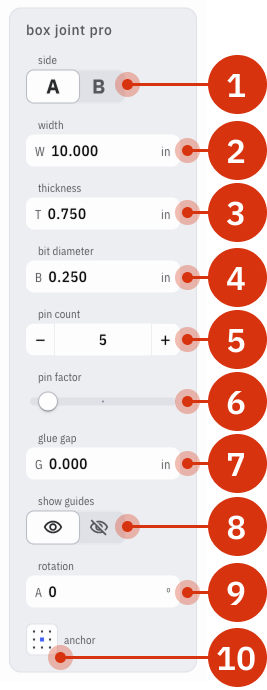 | 1. **Side (A/B)**: Swaps between the A pins and the mating B pins 2. **Width**: applies the width of the intended stock 3. **Thickness**: uses the thickness of the stock to plan the overcut and ensure square pins 4. **Bit Diameter**: determines the curvature of the patterns corners and how much it extrudes from the workpiece to ensure straight corners 5. **Pin Count**: the overall number of pins, A + B 6. **Pin Factor**: Augments the width of the selected pins to create more complex pin arrangements 7. **Glue Gap**: increases the width of the gaps to account for fitment with glue 8. **Guides**: places visual guides that represent the pins 9. **Rotation**: overall rotation of the pattern according to the anchor point in the upper-left position 10. **Anchor**: the point around which the pattern is oriented for movement, sizing, and rotation |
| --- | --- |
*Note: unlike Origin’s Box Joint Basic feature there is no encoded depth to a Box Joint Basic pattern in Studio. [Encoded depths](https://support.shapertools.com/hc/en-us/articles/10400926390683-encoded-depth?hsLang=en) can be setup manually in [Plan Mode](https://support.shapertools.com/cut-plan-menu?hsLang=en).*
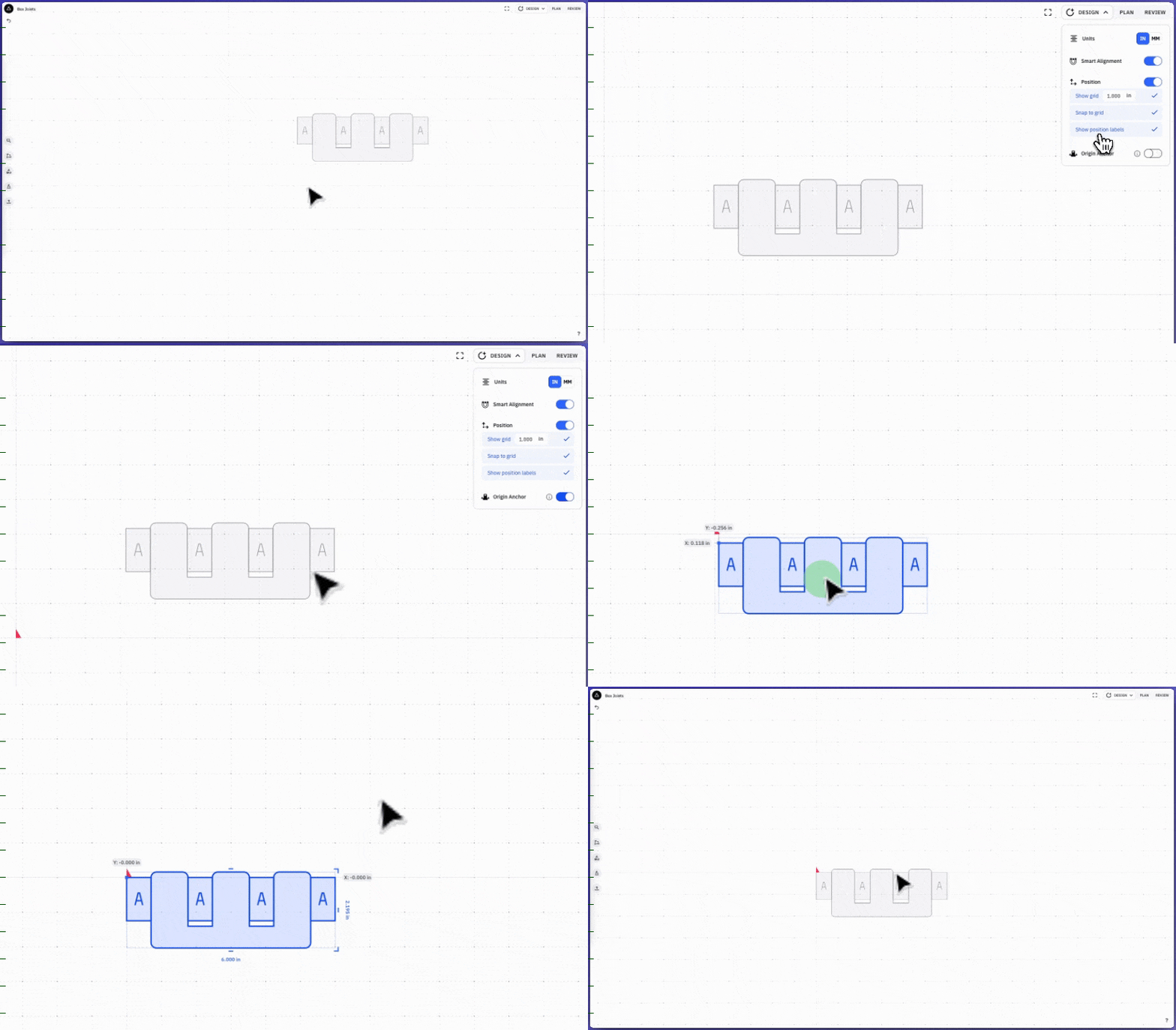
Once the Box Joint pattern is created place it according to the Origin Anchor in Studio to ensure accurate placement on Origin:
#### Using Pin Factor
**Pin Factor** changes the width of pins in both A and B to cut irregular patterns. To do this choose which set of pins you’d like to be wider or narrower and adjust the slider accordingly.
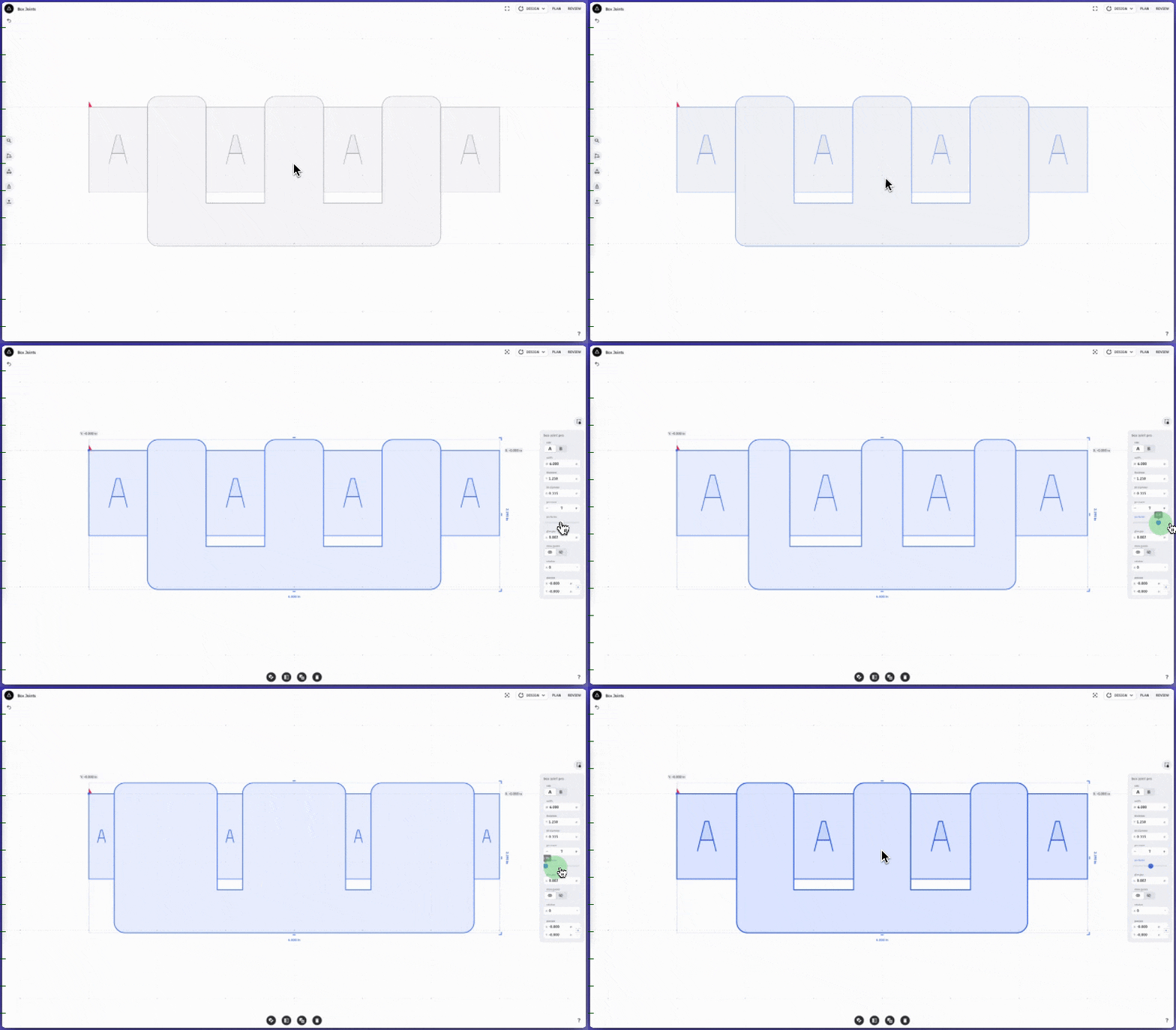*Note: do not adjust the Pin Factor after you’ve started cutting the pins.*
#### Round Tripping with Box Joints in Studio
[Probe Rectangle](https://support.shapertools.com/probe-rectangle?hsLang=en) will create a Guide around the perimeter of the workpiece and setup a Grid to the center of that workpiece. Using [Export from Origin](https://support.shapertools.com/export-from-origin?hsLang=en) will extract the Guide according to Origin's Grid into a Studio design. The Box Joint procedure can then be built around the measurements that came from Origin.
Centering the Box Joint pattern to the 0,0 point in Studio will align the pattern to the Grid that Probe Rectangle created in your Workspace. This is useful to ensure consistent alignment between Studio and Origin.
- [Origin](https://support.shapertools.com/origin?hsLang=en#main-content)
- [Getting Started Guide](https://support.shapertools.com/origin?hsLang=en#getting-started-guide)
- [Workspace Setup](https://support.shapertools.com/origin?hsLang=en#workspace-setup)
- [Scanning](https://support.shapertools.com/origin?hsLang=en#scanning)
- [Design Mode](https://support.shapertools.com/origin?hsLang=en#design-mode)
- [Extensions](https://support.shapertools.com/origin?hsLang=en#extensions)
- [Cut Mode](https://support.shapertools.com/origin?hsLang=en#cut-mode)
- [Cutting Principles and Techniques](https://support.shapertools.com/origin?hsLang=en#cutting-principles-and-techniques)
- [Issues when Cutting](https://support.shapertools.com/origin?hsLang=en#issues-when-cutting)
- [Error Messages](https://support.shapertools.com/origin?hsLang=en#error-messages)
- [Tips and Tricks](https://support.shapertools.com/origin?hsLang=en#tips-and-tricks)
- [Origin FAQs](https://support.shapertools.com/origin?hsLang=en#origin-faqs)
- [Usage FAQs](https://support.shapertools.com/origin?hsLang=en#usage-faqs)
- [Spindle FAQs](https://support.shapertools.com/origin?hsLang=en#spindle-faqs)
- [Returns & Repairs](https://support.shapertools.com/origin?hsLang=en#returns-repairs)
- [BenchPilot](https://support.shapertools.com/benchpilot?hsLang=en#main-content)
- [Connecting to BenchPilot](https://support.shapertools.com/benchpilot?hsLang=en#connecting-to-benchpilot)
- [Before Starting a BenchPilot Cut](https://support.shapertools.com/benchpilot?hsLang=en#before-starting-a-benchpilot-cut)
- [While Cutting with BenchPilot](https://support.shapertools.com/benchpilot?hsLang=en#while-cutting-with-benchpilot)
- [BenchPilot Troubleshooting](https://support.shapertools.com/benchpilot?hsLang=en#benchpilot-troubleshooting)
- [Plate](https://support.shapertools.com/plate?hsLang=en#main-content)
- [Learn About](https://support.shapertools.com/plate?hsLang=en#learn-about)
- [At A Glance](https://support.shapertools.com/plate?hsLang=en#at-a-glance)
- [Aligning Plate](https://support.shapertools.com/plate?hsLang=en#aligning-plate)
- [Origin + Plate Setup](https://support.shapertools.com/plate?hsLang=en#origin-plate-setup)
- [Working with Plate](https://support.shapertools.com/plate?hsLang=en#working-with-plate)
- [Edge Mortising Adapter](https://support.shapertools.com/plate?hsLang=en#edge-mortising-adapter)
- [Maintenance & Technical Data](https://support.shapertools.com/plate?hsLang=en#maintenance-technical-data)
- [Workstation](https://support.shapertools.com/workstation?hsLang=en#main-content)
- [Learn About](https://support.shapertools.com/workstation?hsLang=en#learn-about)
- [Studio](https://support.shapertools.com/studio?hsLang=en#main-content)
- [Using Studio](https://support.shapertools.com/studio?hsLang=en#using-studio)
- [Main Menu](https://support.shapertools.com/studio?hsLang=en#main-menu)
- [Design Mode](https://support.shapertools.com/studio?hsLang=en#design-mode)
- [Plan Mode](https://support.shapertools.com/studio?hsLang=en#plan-mode)
- [Review Mode](https://support.shapertools.com/studio?hsLang=en#review-mode)
- [Templates](https://support.shapertools.com/studio?hsLang=en#templates)
- [License and Account](https://support.shapertools.com/studio?hsLang=en#license-and-account)
- [Trace](https://support.shapertools.com/trace?hsLang=en#main-content)
- [Getting Started](https://support.shapertools.com/trace?hsLang=en#getting-started)
- [Capturing Your Drawing](https://support.shapertools.com/trace?hsLang=en#capturing-your-drawing)
- [Converting Your Drawing to Vectors](https://support.shapertools.com/trace?hsLang=en#converting-your-drawing-to-vectors)
- [Saving Your Vectors](https://support.shapertools.com/trace?hsLang=en#saving-your-vectors)
- [Care & Storage](https://support.shapertools.com/trace?hsLang=en#care-storage)
- [Trace FAQs](https://support.shapertools.com/trace?hsLang=en#trace-faqs)
- [AutoPass](https://support.shapertools.com/autopass?hsLang=en#main-content)
- [Activation](https://support.shapertools.com/autopass?hsLang=en#activation)
- [Before Cutting](https://support.shapertools.com/autopass?hsLang=en#before-cutting)
- [While Cutting](https://support.shapertools.com/autopass?hsLang=en#while-cutting)
- [FAQs](https://support.shapertools.com/autopass?hsLang=en#faqs)
- [Connected Caliper](https://support.shapertools.com/connected-caliper?hsLang=en#main-content)
- [Getting Started with your Connected Caliper](https://support.shapertools.com/connected-caliper?hsLang=en#getting-started-with-your-connected-caliper)
- [Connecting the Caliper to your Device](https://support.shapertools.com/connected-caliper?hsLang=en#connecting-the-caliper-to-your-device)
- [Using the Caliper](https://support.shapertools.com/connected-caliper?hsLang=en#using-the-caliper)
- [Removing the Caliper from your Device](https://support.shapertools.com/connected-caliper?hsLang=en#removing-the-caliper-from-your-device)
- [Care & Maintenance](https://support.shapertools.com/connected-caliper?hsLang=en#care-maintenance)
- [Learn About](https://support.shapertools.com/connected-caliper?hsLang=en#learn-about)
- [Accessories](https://support.shapertools.com/accessories?hsLang=en#main-content)
- [Origin Accessories](https://support.shapertools.com/accessories?hsLang=en#origin-accessories)
- [Basic Bits](https://support.shapertools.com/accessories?hsLang=en#basic-bits)
- [Specialty Router Bits](https://support.shapertools.com/accessories?hsLang=en#specialty-router-bits)
- [ShaperTape FAQs](https://support.shapertools.com/accessories?hsLang=en#shapertape-faqs)
- [Replacement Parts](https://support.shapertools.com/replacement-parts?hsLang=en#main-content)
- [Gen2 Origin](https://support.shapertools.com/replacement-parts?hsLang=en#gen2-origin)
- [Shaper Workstation](https://support.shapertools.com/replacement-parts?hsLang=en#shaper-workstation)
- [Shaper Plate](https://support.shapertools.com/replacement-parts?hsLang=en#shaper-plate)
- [ShaperHub](https://support.shapertools.com/shaperhub?hsLang=en#main-content)
- [ShaperHub](https://support.shapertools.com/shaperhub?hsLang=en#shaperhub)
- [Your Shaper Account](https://support.shapertools.com/your-shaper-account?hsLang=en#main-content)
- [Account Support](https://support.shapertools.com/your-shaper-account?hsLang=en#account-support)
- [Designing for Origin](https://support.shapertools.com/designing-for-origin?hsLang=en#main-content)
- [Overview](https://support.shapertools.com/designing-for-origin?hsLang=en#overview)
- [Adobe Illustrator](https://support.shapertools.com/designing-for-origin?hsLang=en#adobe-illustrator)
- [Affinity Designer](https://support.shapertools.com/designing-for-origin?hsLang=en#affinity-designer)
- [Coreldraw](https://support.shapertools.com/designing-for-origin?hsLang=en#coreldraw)
- [Fusion 360](https://support.shapertools.com/designing-for-origin?hsLang=en#fusion-360)
- [Inkscape](https://support.shapertools.com/designing-for-origin?hsLang=en#inkscape)
- [Palette CAD](https://support.shapertools.com/designing-for-origin?hsLang=en#palette-cad)
- [Rhino 3d](https://support.shapertools.com/designing-for-origin?hsLang=en#rhino-3d)
- [Shapr3d](https://support.shapertools.com/designing-for-origin?hsLang=en#shapr3d)
- [SketchUp](https://support.shapertools.com/designing-for-origin?hsLang=en#sketchup)
- [Pytha](https://support.shapertools.com/designing-for-origin?hsLang=en#pytha)
- [Vectr](https://support.shapertools.com/designing-for-origin?hsLang=en#vectr)
- [Vectorworks](https://support.shapertools.com/designing-for-origin?hsLang=en#vectorworks)
- [Designing Issues](https://support.shapertools.com/designing-for-origin?hsLang=en#designing-issues)
- [Troubleshooting and Maintenance](https://support.shapertools.com/troubleshooting-and-maintenance?hsLang=en)
[](https://shapertools.com?hsLang=en)
Shaper Help Center
Copyright © 2025, Shaper Tools